What private mode protects
Separate transaction records, a local claim ticket and an explicit desk dependency.
Private mode separates the record naming your wallet from the record naming your market ticket. It does not make your activity anonymous. The desk sees the connection, and observers may match transaction amounts and timing.
Explore each part and its connections. Expand to use more of your screen.
Follow an arrow to explore a connected part.
Deposit + spending allowance
What this part does
The owner deposits collateral into PrivateDesk and grants an allowance. This is a separate contract balance from EventVault’s Trading Balance.
Outgoing connections
- From Your private balanceauthorizesAction or record
The owner deposits collateral into PrivateDesk and grants an allowance. This is a separate contract balance from EventVault’s Trading Balance.
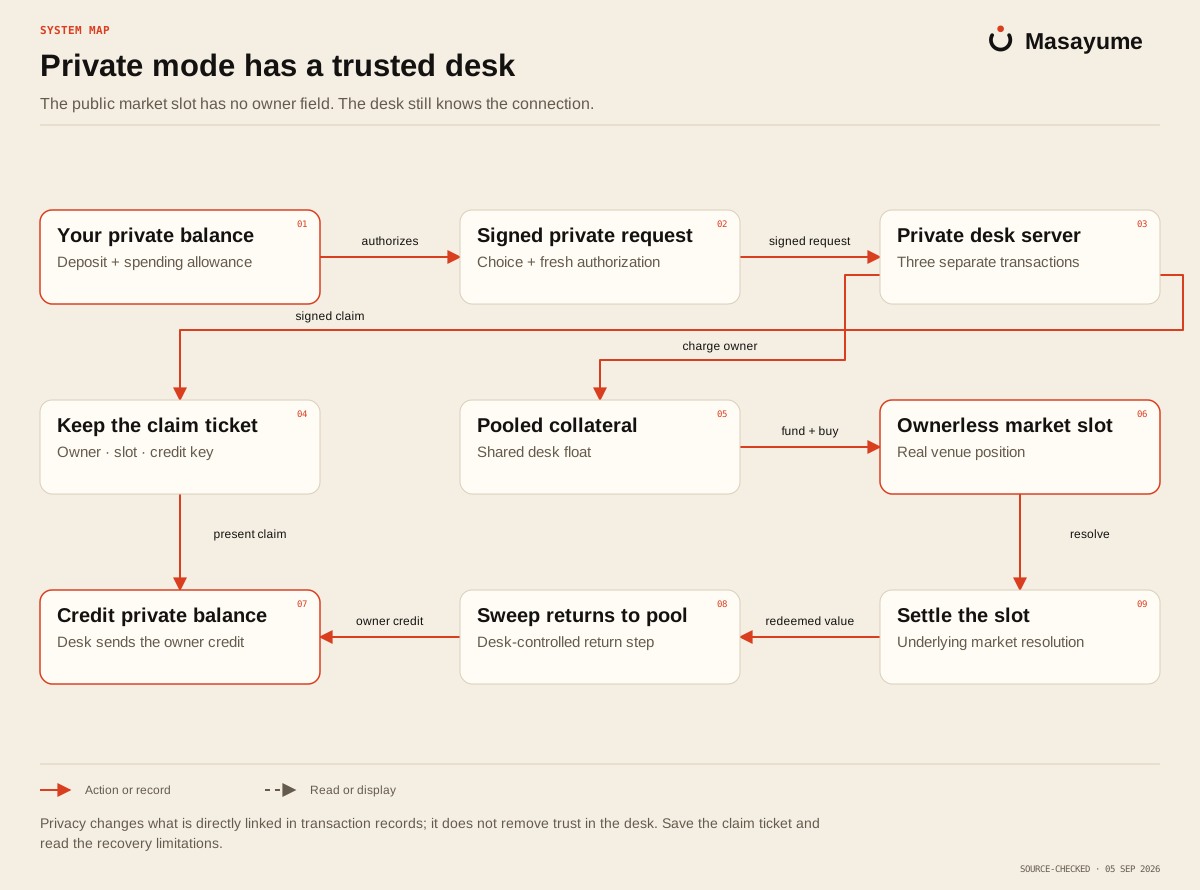
Read the map as text
- Your private balance Signed private request: authorizes.
- Signed private request Private desk server: signed request.
- Private desk server Pooled collateral: charge owner.
- Pooled collateral Ownerless market slot: fund + buy.
- Private desk server Keep the claim ticket: signed claim.
- Ownerless market slot Settle the slot: resolve.
- Settle the slot Sweep returns to pool: redeemed value.
- Sweep returns to pool Credit private balance: owner credit.
- Keep the claim ticket Credit private balance: present claim.
Your private balance
PrivateDesk is a separate contract with its own balance and spending allowance. You deposit, set how much the desk may spend, and withdraw your unused balance yourself. Revoking the allowance prevents new private spending.
This balance is separate from your wallet, Trading Balance and any open ticket.
One private bet uses three transactions
- Charge. The desk moves the approved stake from your balance into a pool. This record names your wallet.
- Fund. The desk moves that amount into a fresh slot. This record names the slot.
- Buy. The desk buys the market side in the slot. The slot stores the position without a wallet owner field.
The browser first signs the exact instruction. The service derives opaque identifiers from the signature, checks funds and quote, then performs the steps. Those identifiers let it inspect chain state if a reply is lost, rather than charging the same instruction again blindly.
Keep the claim ticket
The desk returns a signed claim linking the slot to its owner. The return path uses that claim: settle the market position, sweep the slot back to the pool, then credit the recorded owner's private balance.
The contract may allow anyone to trigger the market settlement, but reconnecting pooled funds to an owner still requires the desk. Treat the claim as recovery material and use the app's claim controls before clearing browser storage.
What you still trust
The desk key is held on the server. It can perform pool and slot operations. The contract's own design acknowledges that a compromised desk can credit pooled funds to an address it chooses. The owner's allowance limits what can be charged from their balance; it does not eliminate the desk's trust role.
Once funds are credited to your private balance, only your wallet withdraws them. Do not extend that owner-only withdrawal rule into a claim that every intermediate private operation is trustless.
If the chain is slow, the app may show an unknown result. Reuse the existing recovery instruction or claim. Creating a new instruction is a different request, and should not be used to guess whether the previous one succeeded.
Source notes
This guide follows the application code reviewed on 2026-09-07. Links point to that reviewed commit and require repository access. GitHub may show 404 if you are signed out or do not have access.