Windows, trades and balances
How a call becomes a filled position, and where its payout goes.
A Window asks whether an asset's closing price will finish at or above its opening print. Up wins at or above the print; Down wins below it. Your cost comes from orders available in the market.
Explore each part and its connections. Expand to use more of your screen.
Follow an arrow to explore a connected part.
Window · Up / Down · stake
What this part does
You choose a live Window, a side and the maximum amount to spend. Up and Down have their own executable order-book prices.
Outgoing connections
- From Your market callreviewAction or record
You choose a live Window, a side and the maximum amount to spend. Up and Down have their own executable order-book prices.
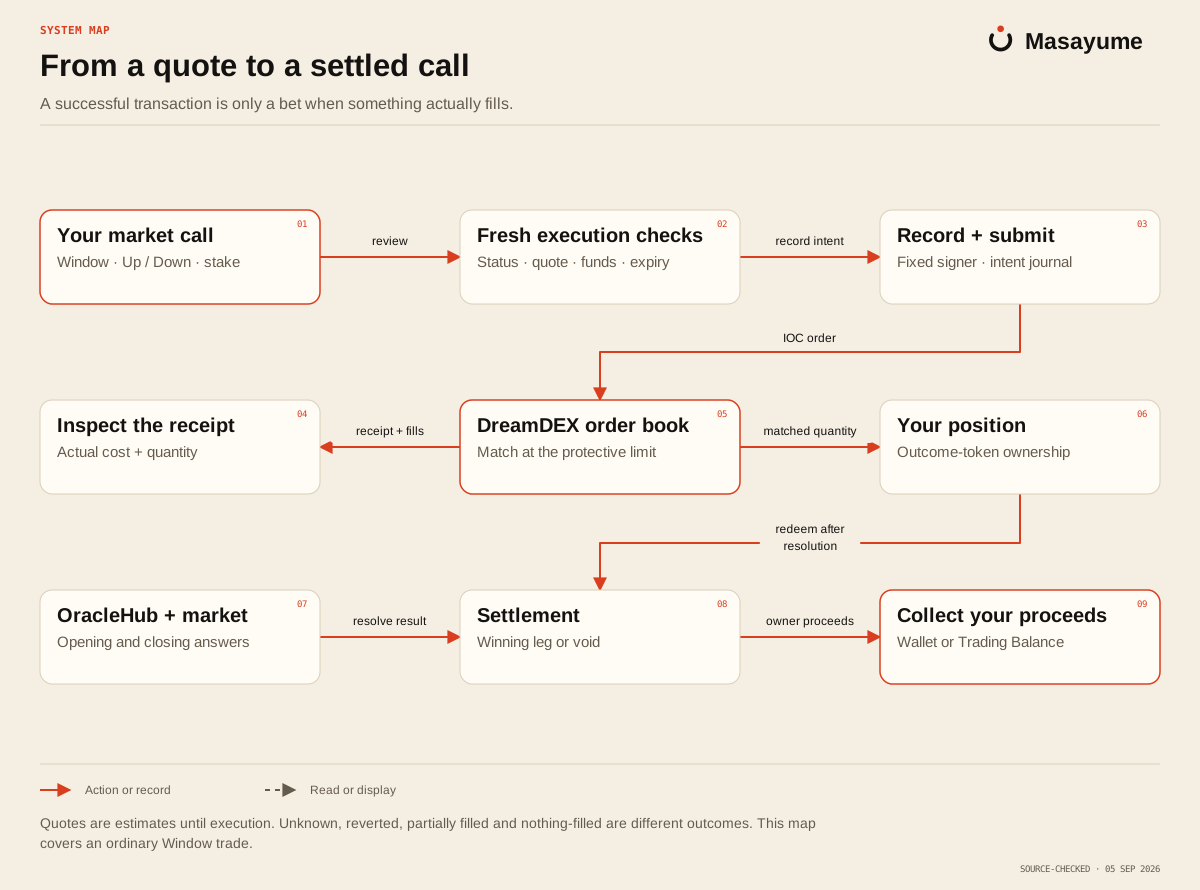
Read the map as text
- Your market call Fresh execution checks: review.
- Fresh execution checks Record + submit: record intent.
- Record + submit DreamDEX order book: IOC order.
- DreamDEX order book Inspect the receipt: receipt + fills.
- DreamDEX order book Your position: matched quantity.
- OracleHub + market Settlement: resolve result.
- Your position Settlement: redeem after resolution.
- Settlement Collect your proceeds: owner proceeds.
From quote to receipt
- The app reads a live Window and quotes your chosen side at your stake.
- Before sending, it rechecks the chain status, time left, current quote and available funds.
- Your signer submits an immediate-or-cancel order with a protective limit.
- Available matching orders fill. The remainder is cancelled.
- The receipt records the quantity and cost that actually filled.
Up and Down quotes are read independently. Do not calculate one as 100 cents minus the other: a live order book may have different available prices on each side.
A sent transaction is not always a filled call
| State | Meaning |
|---|---|
| Requote | The new price is outside the confirmed limit. Review it before sending. |
| Submitted | A transaction is in progress. |
| Filled | A receipt proves contracts were bought. A partial fill records only what matched. |
| Nothing filled | The transaction landed, but no order matched. |
| Reverted | The contract refused the transaction. |
| Unknown | The app cannot yet tell whether the send landed. Check recovery before repeating it. |
An unknown send is recorded and is not automatically retried. This avoids a second purchase while the first may still be pending.
Wallet balance and Trading Balance
Direct-wallet trading buys positions from your wallet. Trading Balance uses Masayume's EventVault. The vault holds the venue tokens and records which person owns each position.
Deposits add to your available balance. A grant moves part of that balance into a budget for one actor. Revoking returns the unused budget. Sale proceeds and settled payouts return to your balance; they do not become the actor's money.
Anyone may trigger settlement of a vault position, but its proceeds are credited to its recorded owner. Withdrawal pays that owner.
Permission types
| Grant | Typical signer |
|---|---|
| Session | Your browser's convenience key |
| Executor | The X mention executor |
| Strategy | The runner of a strategy you copy |
Each grant has an expiry, budget and caps for a trade, daily spend, open positions and optionally price. Daily spend resets on UTC days. Replacing a grant of the same type revokes the previous one.
These are real contract limits. The ordinary wallet order lane also has a Daily Stop extension point, but its default currently allows orders through. It is not a universal daily-loss protection service.
How a Parlay differs
A Parlay combines several Window sides into one ticket. ParlayReserve reads each leg's order book while opening it, calculates the ticket price and reserves the whole maximum payout in advance.
Each leg resolves from its market. All legs must win. A losing leg ends the ticket; a voided leg while the ticket is live refunds the stake. Winning tickets require a claim, which always pays their owner. Read the ticket's actual maximum payout and cost before signing.
Source notes
This guide follows the application code reviewed on 2026-09-07. Links point to that reviewed commit and require repository access. GitHub may show 404 if you are signed out or do not have access.